Envelope budgeting for people whose month starts on payday.
Give each category an amount at the start of your month, tap in what you spend as you go, and always know what is left. No bank to connect, no account to create, no month-end surprise.
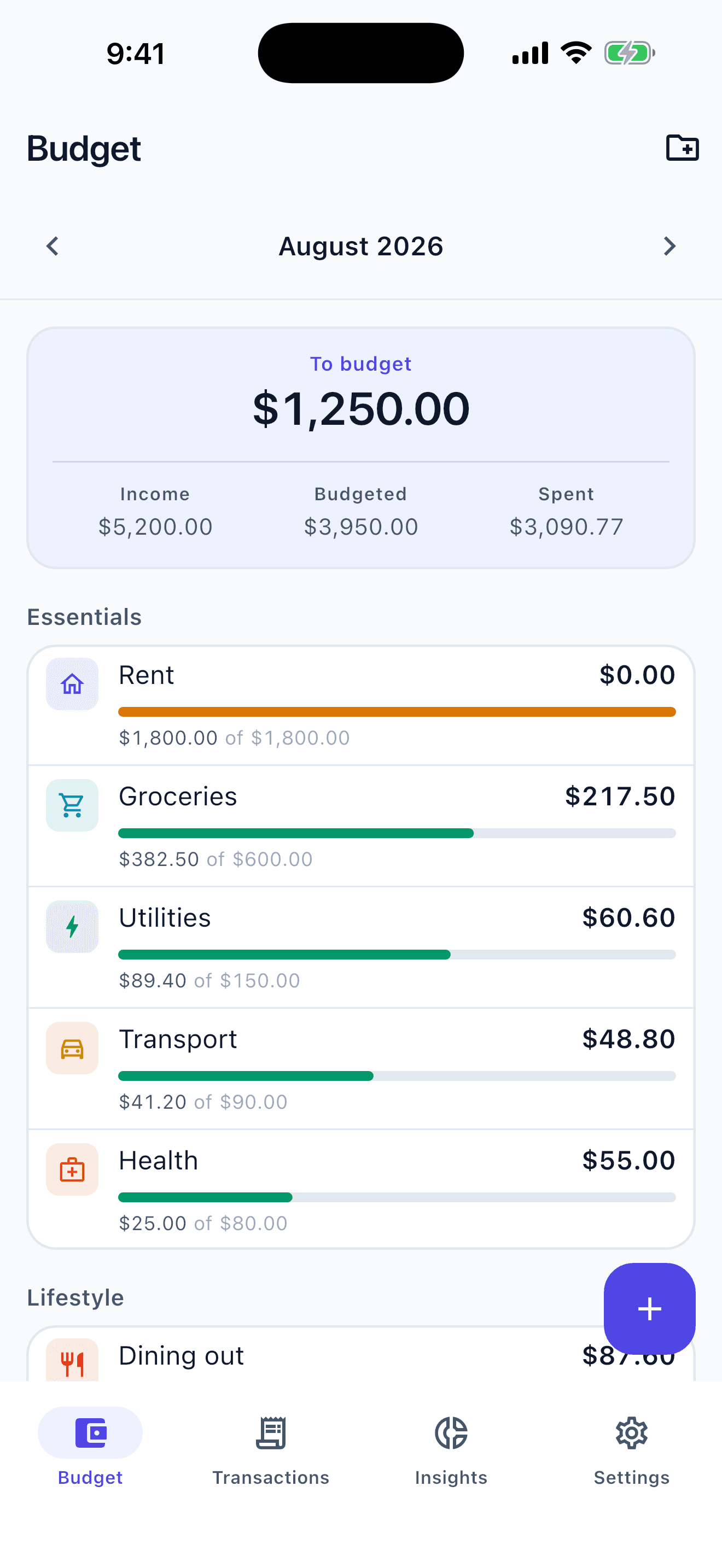


A budget you can keep in five seconds a day
Sixteen starter envelopes, including one for income, or build your own from 29 icons and 12 colours. Twenty-six currencies. Light and dark. No bank password, ever.
Envelopes that draw down as you spend
Each category gets an amount for the month, and the bar under it moves as you record spending. What you do not spend rolls into next month; what you overspend does not follow you there.
A month that starts on the day you get paid
Set your month to begin on any day from the 1st to the 28th, so a budget for someone paid on the 15th runs the 15th to the 14th. Every total, every rollover and every chart uses that same boundary.
Entry built for one hand in a checkout queue
A large keypad, with payee, note, account and date all optional. Cash, checking, savings and credit accounts are supported, and moving money between two of your own accounts is recorded as a transfer that never counts as spending.
Reminders your phone schedules by itself
A bill reminder 1, 3 or 7 days ahead at 9am, an alert when an envelope reaches 80% and again at 100%, and a nudge the day before your month rolls over. None of it goes through a server, because none of it leaves the phone.
A spending ring that adds up to what you spent
The ring sums to your actual total for the period, including envelopes you have since retired, and spending you never categorised gets its own slice instead of being quietly dropped. Underneath it, budgeted against actual, worst overspend first.
Your data leaves only when you send it
Write a full backup to Files, iCloud Drive, email or AirDrop, restore it in one tap, and undo that restore for seven days if it was not the file you meant. There is a permanent erase too, for when you want the app to forget everything.
Nobody holds a copy of your budget. Not even us.
Most budgeting apps begin by asking for read access to your bank. CustomBudget never asks, because it never needs to.
No account
No sign-up, no password, no sync. The app does not know who you are and has no way to find out.
No bank connection
There is no linking, no aggregator and no email scanning. Your balances are numbers you typed in, not a feed somebody else controls.
No usage data sent
No usage event, no diagnostic and no crash report is sent anywhere. Nothing reports what you tap or where you tap it.
No signal needed
There is no network call anywhere in the money path. It behaves the same in a basement as it does on wifi.
Your data, on request
Export a full backup whenever you like, restore it in one tap, or erase everything permanently. Backup is free and always will be.
Even the reminders are scheduled by your phone rather than sent to it. There is no server to send them from.
Why budget this way?
How an envelope budget on your own phone differs from the two usual alternatives
| Feature | CustomBudget | Bank-linked apps | Spreadsheets |
|---|---|---|---|
| Getting started | Set an amount per envelope | Hand over a bank login, wait for the sync | Build the sheet before you can use it |
| Where the data sits | Only in the app’s own storage | Your transactions, on their servers | Wherever you saved the file |
| Your pay cycle | Month can start any day, 1st to 28th | Usually the calendar month | Whatever you are willing to build |
| Bill reminders | Scheduled by your own phone | Pushed from their servers | None |
| Getting your data out | Full backup export, one tap, free | Often locked to the platform | Already yours |
Getting started
CustomBudget
Set an amount per envelope
Bank-linked apps
Hand over a bank login, wait for the sync
Spreadsheets
Build the sheet before you can use it
Where the data sits
CustomBudget
Only in the app’s own storage
Bank-linked apps
Your transactions, on their servers
Spreadsheets
Wherever you saved the file
Your pay cycle
CustomBudget
Month can start any day, 1st to 28th
Bank-linked apps
Usually the calendar month
Spreadsheets
Whatever you are willing to build
Bill reminders
CustomBudget
Scheduled by your own phone
Bank-linked apps
Pushed from their servers
Spreadsheets
None
Getting your data out
CustomBudget
Full backup export, one tap, free
Bank-linked apps
Often locked to the platform
Spreadsheets
Already yours
The questions people ask first
How the envelope method works here, and what the app will not do.
Still have a question? Email us
Your money. Your phone. Nobody else's business.
Set up your first envelope in under a minute. There is nothing to sign up for and nothing to connect.
No account. No bank login. No in-app purchases.
Part of the  Custom Apps family - privacy-first apps that keep your data on your device